
Repeat Practice PlayerBetaPractise the same part of a YouTube video as often as you like (リピート練習プレーヤー)
Try it
Free, no sign-up. Since it plays videos, we recommend using Wi-Fi.
This app is currently in beta. Features and screens may change without notice.
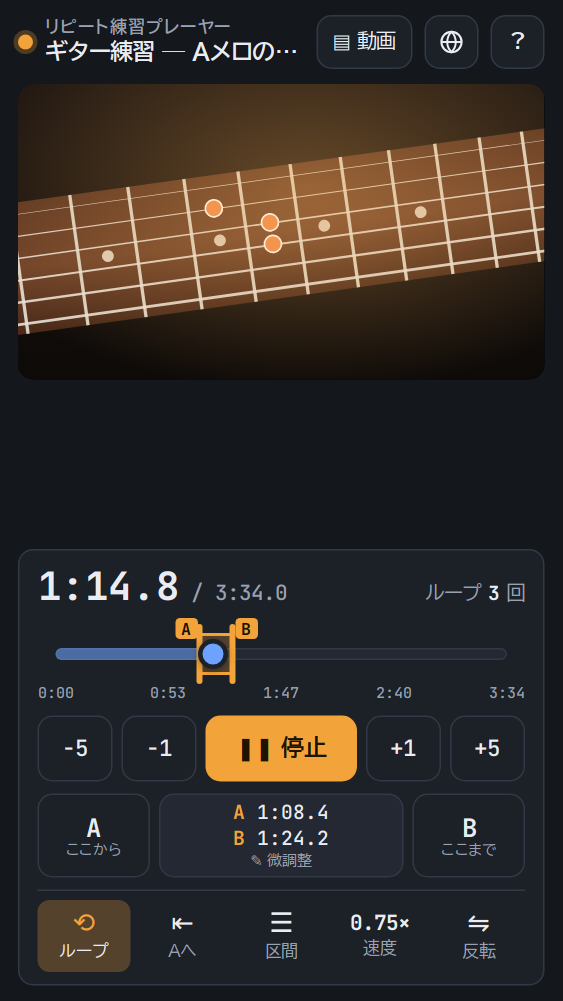
A guitar phrase, a dance routine, a listening exercise. Mark the part of a YouTube video you want to practise with points A and B, and it plays that part over and over. Slow it down or mirror the picture for dance practice, and keep going until you have it. Ranges that work well can be saved with a name.
Features
- Easy A–B loopJust press A and B while the video plays. You can also drag A and B on the slider or fine-tune them in 0.1-second steps.
- Slow playbackChange the speed in nine steps, from 0.25× to 2×.
- MirrorSee a dance routine the same way round as you would in a mirror.
- Pause before loopingAdd a 1 to 3-second pause before each repeat. The 3-second countdown gives you time to get ready.
- Saved sectionsName ranges and save them for each video, then bring them back with a tap. Recently opened videos are one tap away too.
How to use
- Paste the URL of a YouTube video in Video. You can also search YouTube from the app.
- Press A where the part you want to practise starts and B where it ends.
- Press Play and it repeats from A to B.
We recommend using Wi-Fi. Playing YouTube videos over and over uses a lot of data. To avoid using up your mobile data, connect to Wi-Fi.
Your settings, practice sections and recent videos are stored only in your browser and are never sent to our servers. Videos play in YouTube's embedded player, so videos whose owners don't allow embedding can't be played. Available in Japanese, English, Malay, Chinese and Korean.
Try it
Free, no sign-up. Since it plays videos, we recommend using Wi-Fi.